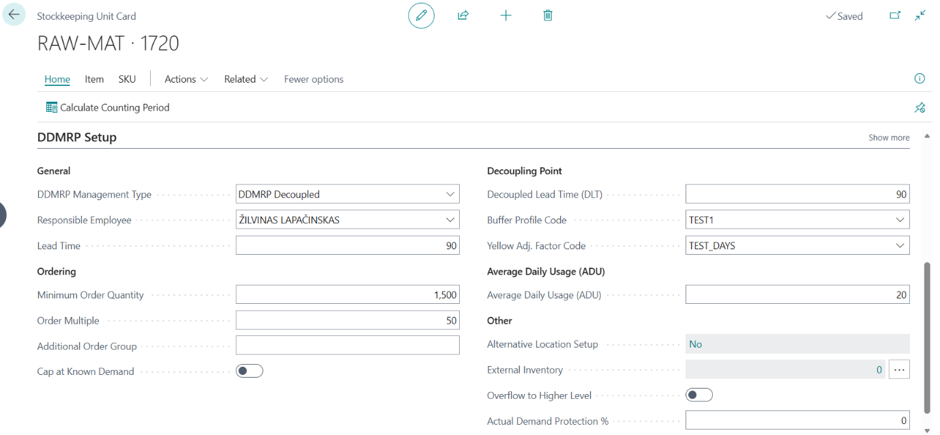
SKU parameters are set on each Stockkeeping Unit Card and control how the item is planned. Open an item, go to its SKU, and use the DDMRP Setup section of the card to review and edit these values. You can also reach the list of stockkeeping units in several other ways: from the Role Center, choose the SKU Count tile (or Decoupled SKU Count) to open the list; search for Stockkeeping Units (or SKU); or open it from the related DDMRP pages such as Calculated ADU Values, States and Alerts, and the Requisition Worksheet. From any of these lists, open a line to get to the SKU card. Softera DDMRP Planner calculates only for SKUs that are set as Included in DDMRP, so this is the first thing to configure for any item you want the system to plan.
Getting these parameters right matters: they drive buffer sizing, replenishment timing, and the alerts planners act on. A SKU that is included but mis-configured (or missing entirely) produces wrong buffers or breaks the supply-chain calculation downstream.
A SKU can be included in DDMRP planning under three different scenarios:
DDMRP Decoupled | For strategic inventory points (Decoupling points). Decoupling Point is a strategically chosen to point in the supply chain where variability and lead-time are absorbed using an inventory buffer |
DDMRP Make-to-order | For net to zero points unprotected by inventory buffer but important as control point. Appears on requisition worksheet when demand exceed availability |
DDMRP | So called technical SKUs that provide information to the system about configuration of supply chain. |
Note: Missing SKUs disrupt calculations along supply chain so that important demand information may not be present at procurement plan. Make sure that supply chain configuration is consistent and links whole supply chain from final product to procured materials. Check Log Errors regularly to avoid missing SKUs.
The table below lists the DDMRP Setup fields on the SKU card, grouped the same way as the card. The three right-hand columns show whether each field is required for the scenario the SKU is set to — Yes means mandatory, Opt means optional, Auto means the value is calculated automatically by the system, and a blank means the field does not apply to that scenario.
Field Name | Field Meaning | Mandatory For | ||
|---|---|---|---|---|
DDMRP Decoupled | DDMRP | DDMRP Replenishment | ||
Standard SKU fields | ||||
Replenishment system | Replenishment system of the SKU. | Yes | Yes | Yes |
Vendor | Is mandatory if replenishment system is Purchase, or Transfer from External warehouse | Yes | Yes | Yes |
Transfer-from Code | Mandatory if the replenishment system is Transfer. | Yes | Yes | Yes |
Components at Location | Specify if components for production or assembly are not in the same location as the SKU. | Opt | Opt | Opt |
General | ||||
Responsible Employee | The user responsible for this SKU. | Yes | Yes | |
Lead Time | The lead time required to replenish the SKU — the supplier, transfer, or production time maintained for it. In DDMRP planning this value is used to calculate Decoupled Lead Time (DLT), which then drives buffer sizing, replenishment due dates on the requisition worksheet, and explosion planning values. | Yes | Yes | Yes |
Ordering | ||||
Minimum Order Quantity | The minimum allowable quantity for an order proposal. In DDMRP planning the MOQ can adjust proposed replenishment quantities; if the MOQ is greater than the calculated Green zone size, the MOQ becomes the Green buffer zone size. | Opt | Opt | |
Order Multiple | The order multiple used to round replenishment quantities. Proposed quantities such as Order Today and Carry Out are adjusted to the nearest valid multiple. | Opt | Opt | |
Additional Order Group | The additional order group for this SKU. Separate Purchase and transfer orders will be created for items with different Additional Order Group. | Opt | Opt | |
Cap at Known Demand | Whether replenishment for DDMRP and Make-to-Order SKUs is limited to known demand. When enabled, Order multiple or MOQ does not increase planned supply beyond what is needed to satisfy known demand within the full future horizon. When disabled, planning may increase quantities to meet minimum order quantities or order multiples. | Opt | Opt | Opt |
Decoupling Point | ||||
Decoupled Lead Time (DLT) | The longest unprotected lead time for a decoupling point — the time to replenish the SKU from upstream supply, calculated automatically from the SKU lead time and related supply-chain parameters. DLT drives the Red, Yellow, and Green buffer zones, replenishment due dates, and explosion planning values. | Auto | Auto | |
Buffer Profile Code | The buffer profile assigned to this SKU. When a profile is assigned, the profile values are used for LTF, VF, Order Spike Horizon, ADU Profile Code, and ADU Calculation Type, and the corresponding SKU-level fields become read-only. Clear the code to use SKU-level values instead. See section Buffer Profiles. | Opt | Opt | |
Yellow Adj. Factor Code | The Yellow Adjustment Factor classifier assigned to this SKU. The classifier adjusts the Yellow buffer zone calculation either by a multiplier (Factor type) or by a days offset (Days type) applied to the DLT. When blank, the standard formula Yellow = ADU × DLT is used. See section Yellow Adj. Factors. | Opt | ||
Order Spike Threshold | The demand quantity used with the Order Spike Horizon to qualify order spikes, calculated automatically as DLT × ADU × LTF × (1 + VF). Future outgoing demand within the horizon that exceeds this threshold is included in qualified outgoing demand. | Yes | ||
Average Daily Usage | ||||
Average Daily Usage (ADU) | The average daily usage of a part, component, or finished good — a key input for buffer sizing and order-spike detection. Entered manually or calculated from history, depending on the ADU Calculation Type and ADU Profile. Must be greater than zero for Decoupled SKUs; set to zero for Make-to-Order SKUs. | Yes | ||
Other | ||||
Alternative Location Setup | Whether alternative locations are defined for this SKU. Alternative locations let DDMRP planning consider inventory availability and demand across multiple warehouses during planning and explosion. | Opt | Opt | Opt |
External Inventory | The quantity of inventory available in external locations (typically held by other legal entities such as vendors, customers, or subcontractors). Including it lets DDMRP planning consider supply outside the company's owned locations. | Opt | Opt | Opt |
Overflow to Higher Level | Whether excess inventory from this SKU can be treated as available supply for its source (higher-level) SKU. When enabled, DDMRP planning can use excess at lower levels to reduce unnecessary replenishment higher up. | Opt | Opt | |
Actual Demand Protection % | The percentage of actual-demand protection applied to actual and planned demand. | Opt | Opt | |