After downloading and installing the Softera.eDoc app, most of the setup is filled in automatically. In order to start using the app, i.e. start sending sales documents to PEPPOL network, you need to review and add information in the places listed below.
Units of measure
When sending information about posted sales invoices, it is important to unify the units of measurement of goods and / or services in the BC and PEPPOL systems. To do this, in the BC list "Unit of Measurement", fill in the values in the column "International Standard Code" for the required units of measurement.
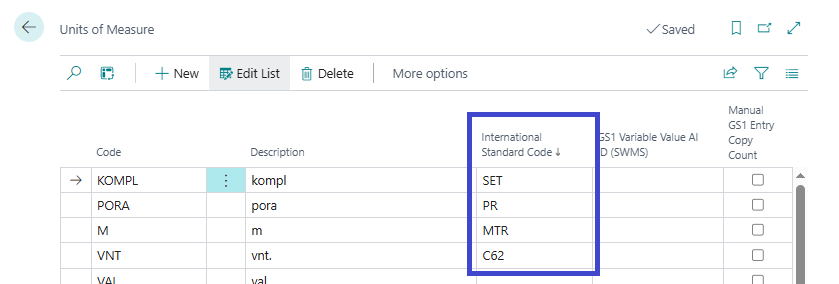
The above example shows several units of measurement and their international standard codes. It should be noted that "Unit" corresponds to the code "C62" in the PEPPOL system.
More detailed information about the codes for unit of measurement in the PEPPOL system can be found in the following documentation:
https://docs.peppol.eu/poacc/billing/3.0/bis/#_unit_of_measure
VAT posting setup
When sending information about posted sales invoices, it is important to unify the VAT posting setup in the BC and PEPPOL systems. To do this, in the BC list "VAT Posting Setup", fill in the values in the column "Tax Category" for the required VAT setups.
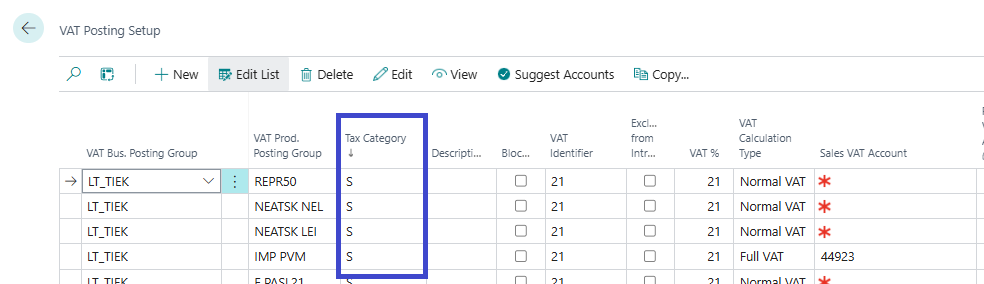
The above example shows that the code "S" is used, which corresponds to the standard tax category.
More detailed information about VAT category codes in the PEPPOL system can be found in the following documentation:
https://docs.peppol.eu/poacc/billing/3.0/bis/#_vat_category_codes
E-Document service
After installing the Softera.eDoc app, an "E-Document Service" called "E-DOCUMENTS" is automatically created.
.PNG)
You need to fill in the following fields in the created service card:
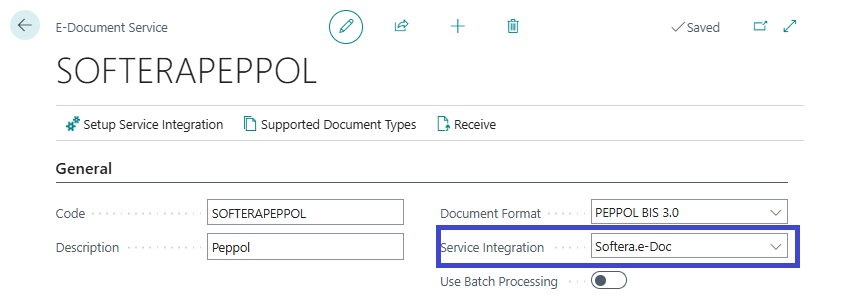
- Select the "Service Integration" type "Softera.e-Doc".
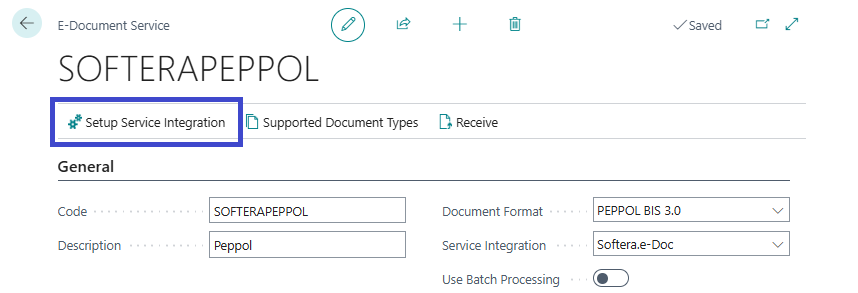
- Specify the necessary information for this integration. To do this, click "Setup Service Integration" and fill in the information in the card that opens:
| Field name | Field description |
|---|---|
| Client ID | This information is provided by the consultant overseeing the installation of the Softera.eDoc app |
| Client Secret | This information is provided by the consultant overseeing the installation of the Softera.eDoc app |
| Environment Type | After installing the Softera.eDoc app, the default value of this option is "Sandbox". After filling in all the settings, the value should be changed to "Production" |
| Supplier Endpoint Info | After installing the Softera.eDoc app, the default value for this option is "Default" and this means that the supplier will be identified using default information. If the value "Specific" is selected, then the following information about the the endpoint will be used. Usually the value "Specific" is used |
| Supplier Endpoint Scheme Id | This information must be filled on the basis on the information in the SABIS system that identifies the invoice supplier. Usually it is "0200" that means, that the supplier is identified by its registration no. |
| Supplier Endpoint Id | This information must be filled on the basis on the information in the SABIS system that identifies the invoice supplier. Usually it's the registration no. of the supplier |
| Document No. Usage | Specifies which document number will be used to identify the invoice |
After completing the general setup listed above, the Softera.eDoc app is ready to use.
Additional information
For more information about the data types used in PEPPOL integration:
https://docs.PEPPOL.eu/poacc/billing/3.0/bis/