For every customer, that will need to receive a sales invoice using the Softera.eDoc app, the setup mentioned below must be done in their customer card.
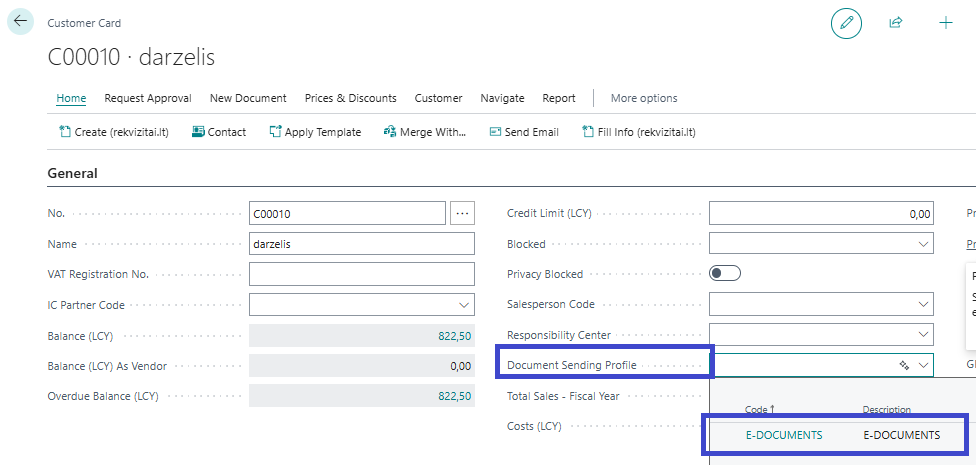
- Specify "Document Sending Profile". According to this selection, BC will understand that after posting a sales invoice, it needs to be further processed using the Softera.eDoc app. The required profile is created automatically. It's named "E-DOCUMENTS".
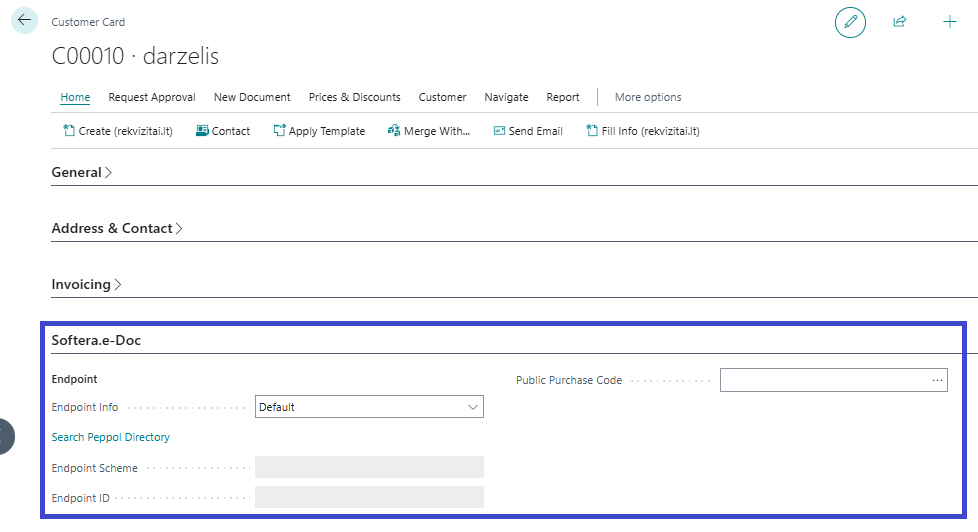
- In the card tab "Softera.e-Doc", the fields must be filled in:
| Field name | Field description |
|---|---|
| Endpoint Info | After installing the Softera.eDoc app, the default value for this option is "Default". If this option is left, then the following fields "Endpoint Scheme" and "Endpoint ID" can only be filled with the "Search Peppol Directory" option. If changed to "Specified", then the mentioned fields can be filled manually |
| Endpoint Scheme | This information must be filled on the basis on the information in the SABIS system that identifies the invoice receiver. Usually it's "0200" and it means that the customer is identified by its registration no. |
| Endpoint ID | This information must be filled on the basis on the information in the SABIS system that identifies the invoice receiver. Usually it's the registration no. |
| Public Purchase Code | Indicates the contract under which sales invoices are issued. If there is no contract, a Public Purchase with type "Verbal Agreement" must be used. Then information about the contract will not be sent to PEPPOL. Several contracts may be valid with one customer. In this case, the sales document must specify the exact contract under which the sale is made (more detailed information in "Working with documents") |
To check or enter the customer's endpoint information, you can use the "Search Peppol Directory" option. To do this, you need to fill in the customer's name or a fragment of it in the "Name" field of the customer's card, and by clicking the mentioned selection, the system will find possible matches in the PEPPOL directory. After selecting the required customer and clicking "OK", the customer's identification information will be automatically filled in the required Softera.eDoc customer identification fields.
Company names in SABIS system are the ones provided by VĮ Registrų Centras. The search in the Peppol directory is made by all of the words in the "Name" field. If there are additional words, that are not in the name provided by VĮ Registrų Centras, the search will not work. Example:
- VŠĮ Lietuvos sveikatos mokslų universiteto Kauno ligoninė - will not be found.
- Lietuvos sveikatos mokslų universiteto Kauno ligoninė - will be found.
Therefore, if the "Search Peppol Directory" is not working, temporary change the customer "Name" to its fragment (In the adobe example: "sveikatos mokslų", "Kauno universiteto ligoninė" and etc.) and try the search again.
After filling in the required information in the customer's card for Softera.eDoc, sales documents can be created for the customer.