Dynamic buffer adjustments keep each decoupling point's buffer sized to current demand. The buffer zones are driven by Average Daily Usage (ADU), so the system adjusts the buffers by recalculating ADU rather than by editing the zones directly. This matters because demand changes over time — without updating ADU, buffers drift out of step with reality, and you end up either short or overstocked.
You manage ADU per SKU; the SKU's ADU Calculation Type decides how it is maintained.
SKU Average daily usage should be relevant to expected average daily usage for upcoming period. Depending on SKU Setup you may perform different ADU management routines:
Manual – manual input of expected ADU value
Worksheet – calculated ADU values will be presented on ADU worksheet for user verification.
Dynamic – SKU ADU will be automatically updated with each ADU calculation.
Note: System calculates average daily usage from past transactions. Make sure that past data is relevant to be used for future periods, otherwise please select Manual ADU Calculation type, or modify calculated values on ADU worksheet.
For Worksheet and Dynamic routines please make sure that ADU calculation profiles are set and assigned to desired SKUs.
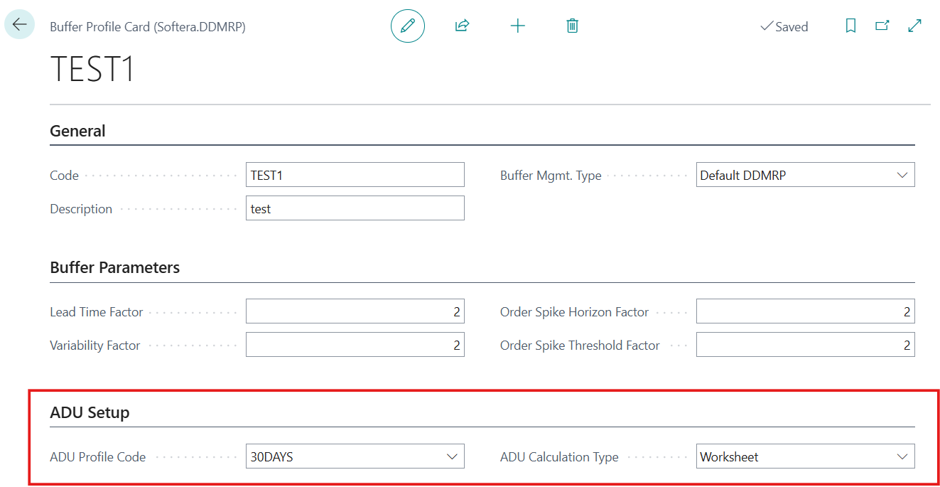
On the Buffer Profile Card, the ADU Calculation Type and ADU Profile fields (in the ADU Setup section) control how ADU is maintained for the SKU.
Besides ADU recalculation, buffers can also be adjusted over time using Yellow Adjustment Factors — date-based classifiers that raise or lower the Yellow zone for selected periods, for example to prepare for a seasonal peak. See section Yellow Adjustment Factors for setup details.
Run Calculate ADU Values
Run Calculate ADU Values recalculates ADU for the SKUs in scope, using each SKU's ADU profile and consumption history. Run it from the Role Center Process group (Calculate ADU Values), or schedule it in the job queue so buffers stay current automatically.
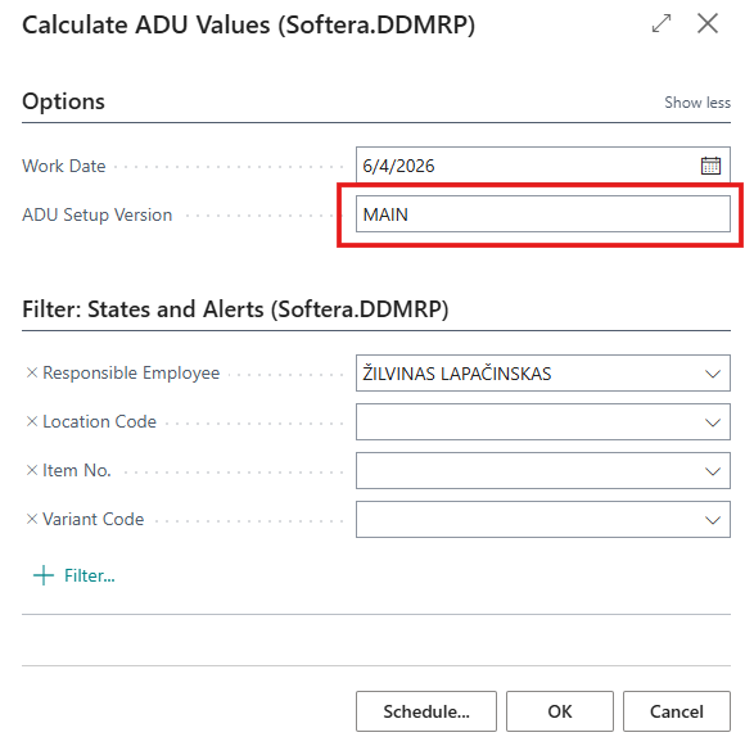
Indicate which version of ADU is calculated.
Calculated ADU Values
The Calculated ADU Values worksheet is where you review proposed ADU updates before they are applied to the SKUs. It is useful because it puts every line that needs your attention in one place — SKUs set to Worksheet, plus Dynamic ones whose past data was flagged as not reliable — so you confirm or adjust the new ADU instead of having buffers updated blindly. Open it from the Role Center Management group by choosing the Calculated ADU Values tile or searching for ADU Worksheet (Softera.DDMRP).
Please check ADU Calculated ADU values worksheet if there are some lines:
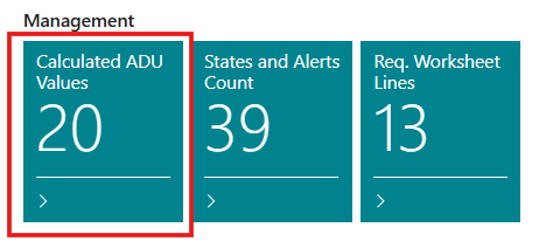
The Role Center Calculated ADU Values tile shows how many SKUs are waiting on the worksheet. Choose the tile (or search for ADU Worksheet) to open it.
Here you will find:
Calculated ADU values for SKUs with ADU calculation type Worksheet.
Calculated ADU values for SKUs with ADU calculation type Dynamic but past data was not reliable.
The ADU Worksheet lists the SKUs with values to review. For each line you see the current and calculated ADU, the editable Carry Out ADU, the projected average inventory with each, the ADU calculation type, the transaction count behind the calculation, and whether the past data is flagged as not reliable.
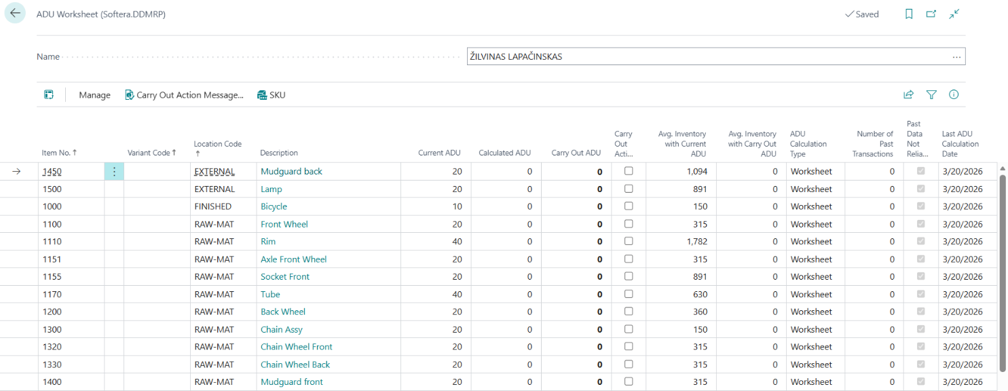
Field Name | Field Meaning |
|---|---|
Item No. | The item the ADU calculation is for. |
Variant Code | The item variant, if applicable. |
Location Code | The location of the SKU. |
Description | The item description, shown for reference. |
Current ADU | The currently active ADU for the SKU, before the new calculation is applied. |
Calculated ADU | The ADU calculated from historical item ledger usage for the SKU and ADU profile — usage over the profile period divided by the number of days, rounded to 0.01. |
Carry Out ADU | The ADU that will be written to ADU Setup if you carry out the line. Changing it recalculates the projected average inventory with the carry-out ADU. |
Carry Out Action | The action to perform when carrying out the ADU update. |
Avg. Inventory with Current ADU | The projected average inventory based on the current ADU setup, calculated as Red Buffer + (Green Buffer / 2). |
Avg. Inventory with Carry Out ADU | The projected average inventory if the Carry Out ADU were applied — use it to compare the inventory impact before updating ADU Setup. |
ADU Calculation Type | How the SKU's ADU is maintained: Manual, Worksheet, or Dynamic (from historical demand). |
Number of Past Transactions | The number of historical transactions found in the ADU calculation period. Higher counts give a more reliable calculation. |
Past Data Not Reliable | Indicates the historical entries are below the ADU profile minimum. When set, the calculated ADU is not carried out automatically and should be reviewed. |
Last ADU Calculation Date | The start date from which historical usage was analyzed for this calculation. |
Additional columns (hidden by default — can be added through Personalization) | |
ADU Profile Code | The ADU profile used for the calculation (history period and minimum transaction count). |
Item Category Code | The item category, used for filtering and reporting. |
Worksheet Batch Name | The ADU worksheet batch this line belongs to. |
Line No. | The line number within the ADU worksheet batch. |
Work Date | The date the ADU calculation was performed. |
ADU Version | The version of the ADU calculation logic used. |
Transaction Count | The total number of transactions considered during the calculation. |
Carry Out Action Message
Carry Out Action Message is the step that applies the proposed ADU updates from the worksheet. It is needed because the values on the worksheet are only suggestions until you carry them out — running it writes the Carry Out ADU values to ADU Setup, so the buffers reflect the new ADU on the next planning run. Review and adjust the lines first, then:
Correct Carry Out ADU Values (optional, if needed)
Enable Carry Out Action for lines to be carried out.
Press Carry Out Action message.
You may filter lines to carry out values in batches.
On the ADU Worksheet, adjust the Carry Out ADU if needed, tick Carry Out Action for the lines you want to apply, and then choose Carry Out Action Message to write the new ADU values to ADU Setup.
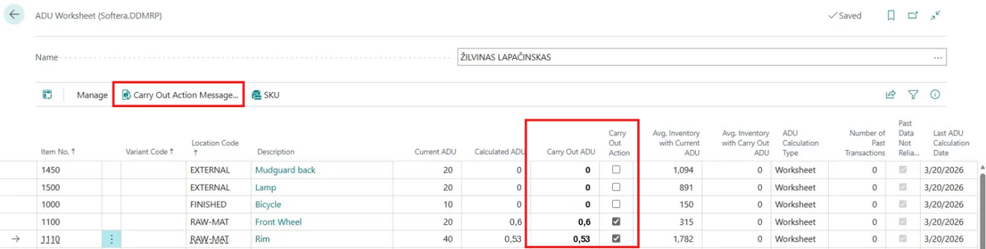
In case you do not need to carry out some lines, it is advisable to delete them from worksheet.
ADU Log Entries
ADU Log Entries records every ADU change for a SKU — automatic and manual — so you can see how the buffers got to where they are. It is useful when an ADU value or a buffer level looks unexpected: the log tells you when it changed, what it changed from and to, which profile or worksheet drove it, and who confirmed it. For SKUs set to Dynamic ADU calculation, values are updated automatically; the log is the only place to verify those updates after the fact.
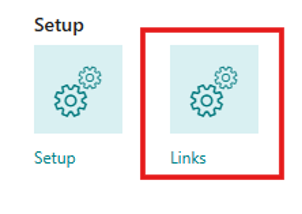
Open it from the Role Center Setup group: choose Links, then under ADU Values select ADU Log Entries. You can also search for ADU Log Entries (Softera.DDMRP) to open it directly.
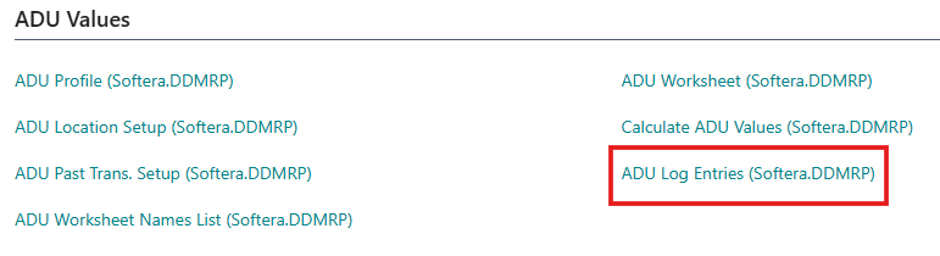
Each row records one ADU change for a SKU — previous and new ADU, the ADU profile, calculation type, lead time, change source (Worksheet, Manual, etc.), change reason (e.g. "Updated from ADU Worksheet" or "Manual ADU override"), and who made it. Filter by Item No., date, or change source to investigate a specific buffer movement. Running Calculate ADU for a single SKU also creates a log entry, so manual recalculations on one item are traceable the same way as bulk recalculations.
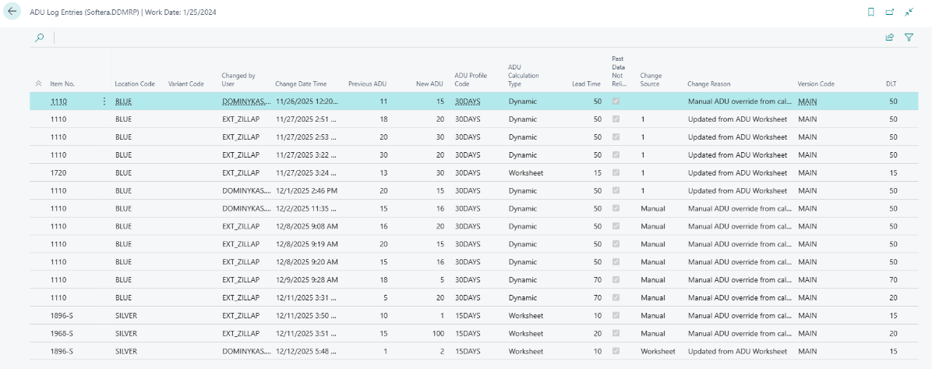
Field Name | Field Meaning |
|---|---|
Item No. | The item the ADU change is for. |
Location Code | The location of the SKU where the ADU change occurred. |
Variant Code | The item variant, if applicable. |
Changed By User | The user who made the ADU change. |
Change Date Time | The date and time when the ADU was changed. |
Previous ADU | The ADU value before the change. |
New ADU | The ADU value after the change. |
ADU Profile Code | The ADU profile used for the calculation. |
ADU Calculation Type | The calculation type used for determining the ADU. |
Lead Time | The lead time value used in the ADU calculation. |
Past Data Not Reliable | Indicates whether past data was considered unreliable for the ADU calculation. |
Change Source | The source that triggered the ADU change (e.g. Worksheet, Manual). |
Change Reason | The reason for the ADU change. |
Version Code | The ADU setup version code used for the calculation. |
DLT | The Decoupled Lead Time (DLT) value used in the ADU calculation. |
LTF | The Lead Time Factor (LTF) used in the ADU calculation. |
VF | The Variability Factor (VF) used in the ADU calculation. |
Minimum Order Quantity | The minimum order quantity used in the ADU calculation. |
Transaction Count | The number of transactions considered in the ADU calculation. |